
Connecting accounts
Connect a Facebook Page
Connect a client's Facebook Page for posting, analytics and Messenger, and connect its linked Instagram at the same time.
Koda connects Facebook Pages, not personal Facebook profiles. Connecting a Page lets you publish to it, see its analytics and answer Messenger conversations in the inbox. If the Page has an Instagram Business or Creator account linked, you can connect both in one go.
Before you start
- The person logging in must be an admin of the Page on Facebook.
- To connect Instagram too, the Instagram account must be linked to the Page in the Page's settings on Facebook.
Connect the Page
- Open Integrations (under Setup in the client sidebar).
- On the Facebook row, click Connect.
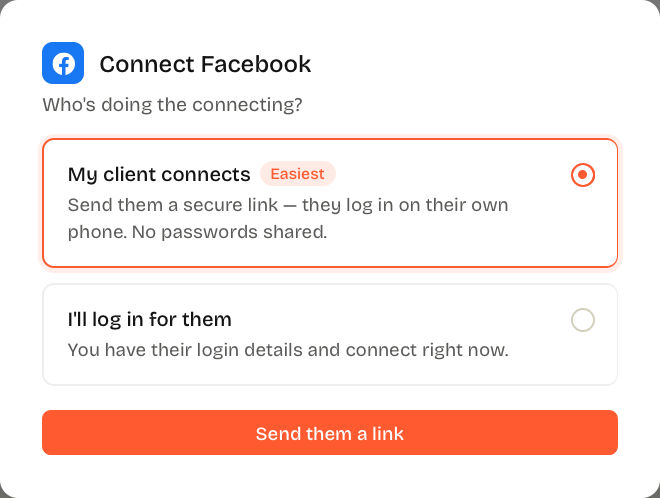
- Choose I'll log in for them, then click Open Facebook. To have the client do it, choose My client connects and see client connect links.
- Log in to Facebook and approve Koda.
- Koda shows a list of your Pages. Click Connect both to connect a Page and its Instagram, or Facebook only to leave Instagram out. Pages with no Instagram linked have a Connect Facebook button instead.
- If you connected Instagram, Koda offers Continue to Instagram to switch on DMs. You can Skip for now.
If the client's Instagram is already connected, the picker puts the matching Page first under Matches this client with Connect this Page. Other Pages only offer Connect Facebook only, so a reconnect can't move the client's Instagram to a different brand.
Can't see the Page?
- "No Facebook Pages on your account" means the Facebook login you used doesn't manage any Pages.
- If a Page is missing from the list, check you're an admin of it on Facebook, then connect again.
When it's connected
The Facebook row shows the Page name. Posts publish to it when Facebook is ticked on a post. Analytics shows Page analytics, and Messenger conversations appear in the inbox.
If Analytics shows Reconnect to unlock full Facebook analytics, click Reconnect and go through the Facebook login once more.
Still stuck? Email [email protected] and we'll help.