
Billing
Your free trial
How Koda's 14-day free trial works, why it asks for a card, what happens when it ends, and how to cancel without being charged.
Every new Koda organisation gets one 14-day free trial on any plan. You pay nothing today, you get the full plan straight away, and your first payment is taken when the trial ends.
Start your trial
After you sign up and answer a few setup questions, Koda shows the plan picker, headed Try Koda free for 14 days. Until you start the trial, your workspace is read-only.
- Pick a plan. Studio is selected to start with; click another plan to switch. If you only manage your own brand, click Personal is £9.99 a month at the bottom.
- Click Start 14 days free to pay monthly, or Pay yearly to pay for the year (saving two months).
- Enter your card on the Stripe checkout page. If you have a discount code, add it here.
- You're taken back to Koda with the message "Your free trial has started. Welcome aboard."
Only an admin can start the trial. Other team members see a note that the workspace is read-only until the organisation admin chooses a plan. You can't start a trial or buy a plan inside the Koda iPhone app, so do this on the web.
During the trial
Open Billing (under Settings in the main sidebar) to see how long is left. The plan card reads "Free trial", followed by the days left and the date of your first payment.
In the last five days, admins also see a banner at the top of the app saying how many days are left and when your card will be charged, with a Manage billing button.
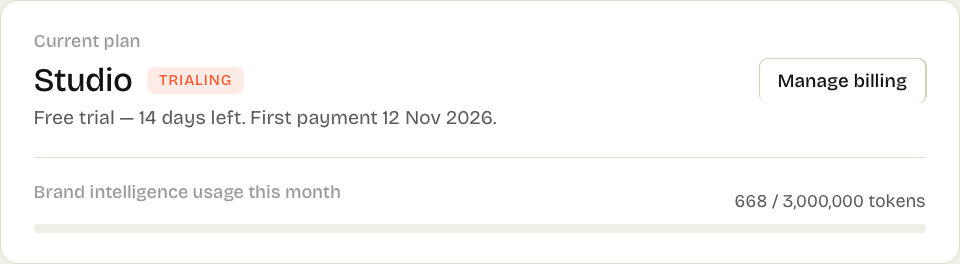
You can change plan during the trial from the Billing page. See Manage your subscription.
When the trial ends
On day 14 your card is charged for the plan and billing period you chose, and your subscription carries on as normal. You don't need to do anything.
If that first payment doesn't go through, you get a few days to sort it before the workspace locks. See Failed payments.
Cancel before you're charged
- Go to Billing and click Manage billing. Stripe's billing page opens in a new tab.
- Cancel your subscription there before the trial's end date.
Cancel before the trial ends and you won't be charged. Once the subscription has ended, your workspace becomes read-only again: you can still see your clients and work, but you can't add or change anything until you choose a plan. Nothing is deleted.
One trial per organisation
Each organisation gets one free trial, ever. If you cancel and come back later, the plan buttons say Choose rather than offering a trial, and you're charged when you subscribe.
Still stuck? Email [email protected] and we'll help.