
Inbox
Reply to comments
Read and reply to comments on a client's Instagram posts from the Koda inbox.
Comments on a client's 12 most recent Instagram posts appear in the inbox next to their DMs. Your reply is posted publicly under the comment, from the client's account.
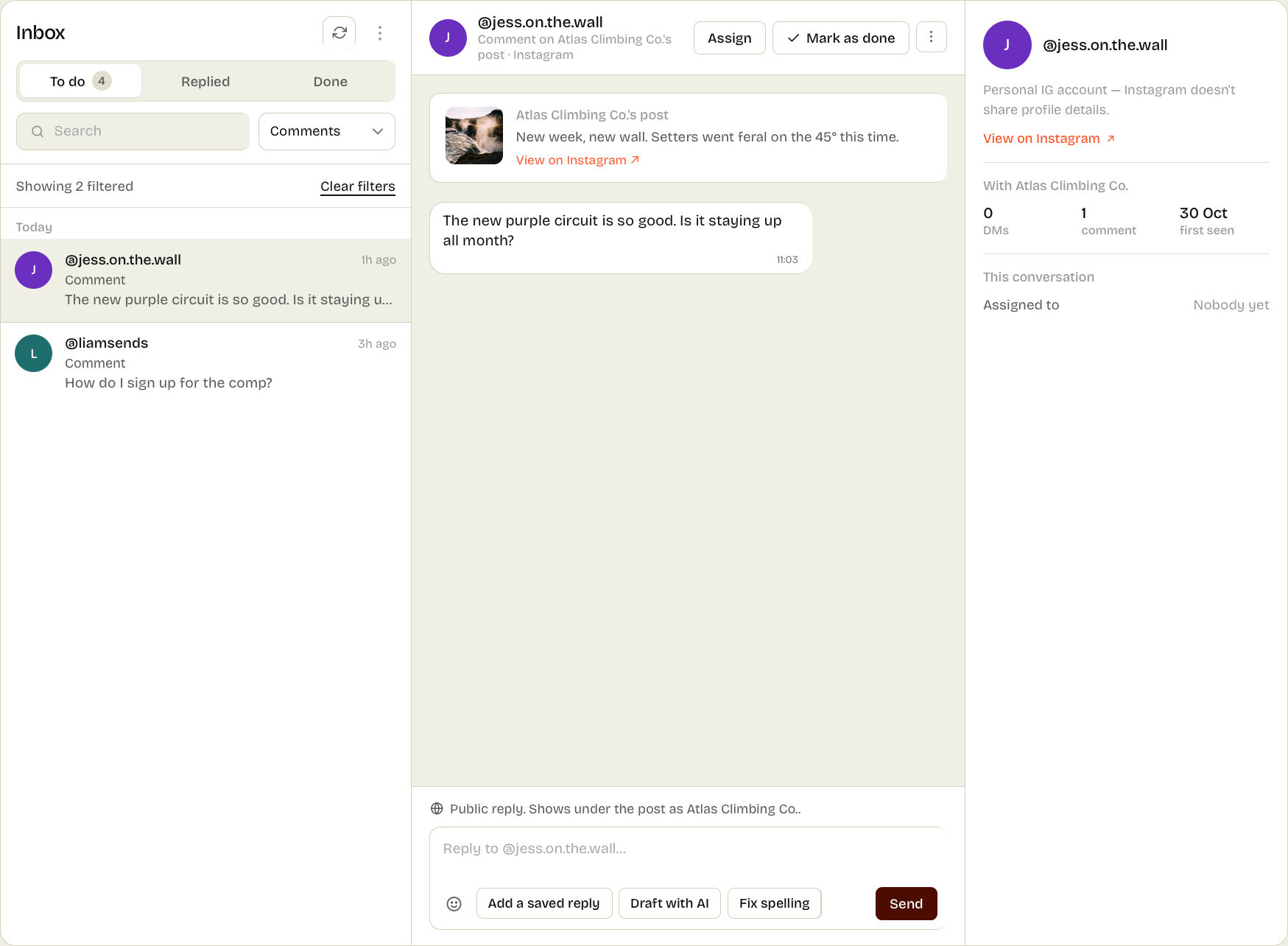
Reply to a comment
- Open Inbox (under Daily in the client sidebar).
- To see only comments, pick Comments from the type menu next to Search.
- Click a comment. The thread shows the post's thumbnail and caption, a View on Instagram ↗ link, the comment and any replies so far.
- Type your reply and press Enter or click Send.
The note above the reply box reminds you that it's a public reply and which account it'll show as. Replies are text only. You can't attach photos to comment replies.
Unlike DMs, comments have no reply window, so you can answer them at any time.
Helpful tools in the reply box
The same tools as DMs are available:
- Saved replies for answers you use often.
- Add emoji for the emoji picker.
- Draft with AI to write a reply in the client's voice, using the post caption and the comment. Read it before you send it.
- Fix spelling to correct spelling and grammar without rewording.
Reply to DMs explains these in more detail.
Who wrote the comment
If the commenter has a business or creator account, Koda shows their handle, follower count, number of posts and bio in the right-hand panel. Instagram hides details for personal accounts, so these show as Personal IG account. Your replies still thread under their comment as normal.
The panel also counts how many DMs and comments that person has sent this client. People with three or more show a Frequent label, which helps you spot regulars.
When a comment counts as replied
A comment moves from To do to Replied once the client's account has replied to it, whether you replied in Koda or in the Instagram app. Replies from other people in the thread are shown with their handle and don't count.
If replying doesn't work
If you see "Connect Instagram in Integrations to reply to comments", the client's Instagram connection doesn't include comment access. Reconnect Instagram from Integrations (under Setup in the client sidebar). See Reconnect accounts.
Still stuck? Email [email protected] and we'll help.